

HRXpert brings every HR operation into one unified platform — leaves, attendance, timesheets, payroll, projects, assets, and more. Built for growing teams that need clarity and control.
Every screen in HRXpert is designed for speed and ease-of-use — from your morning dashboard check-in to monthly payroll processing.
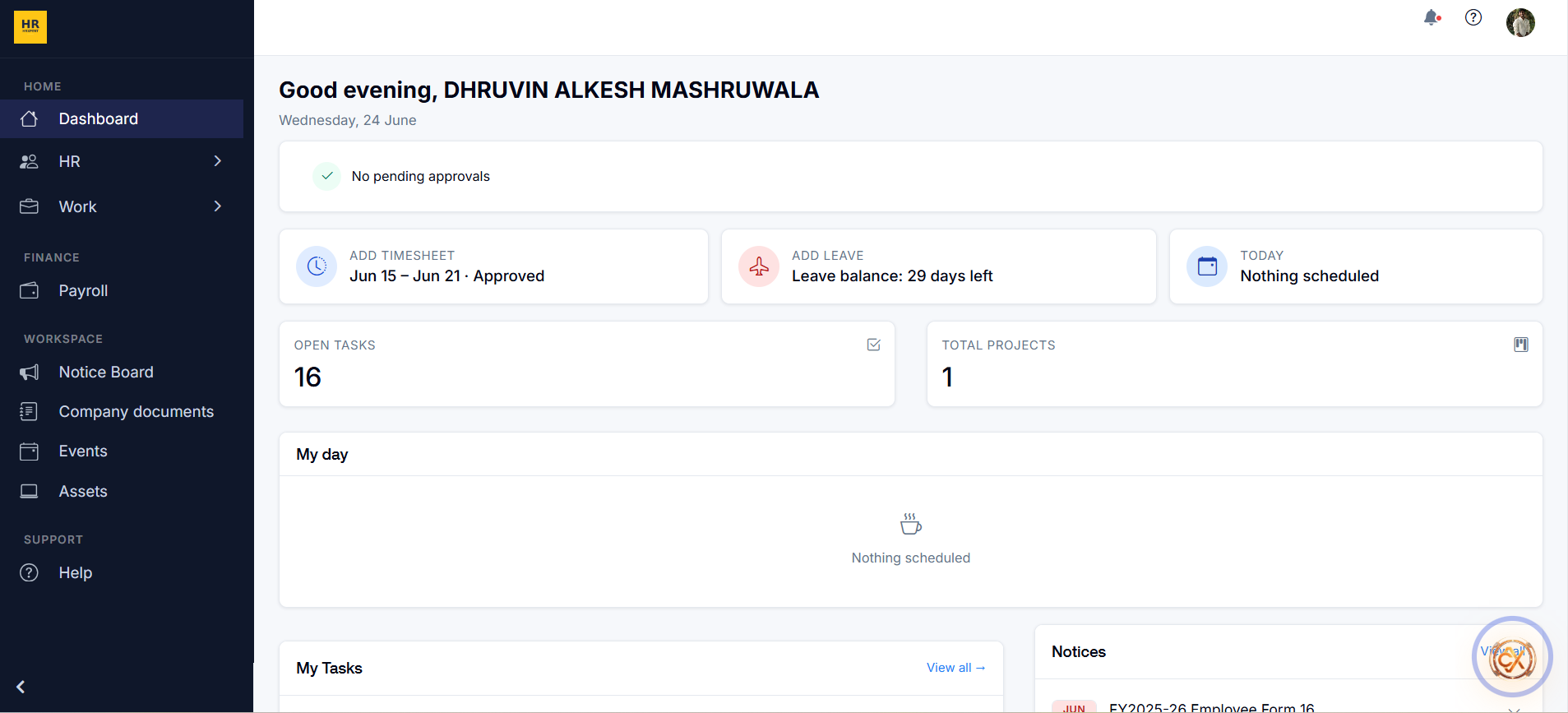
Start your day with a clear picture — pending approvals, leave balance, open tasks, scheduled timesheets, notices, and upcoming events, all in one view.
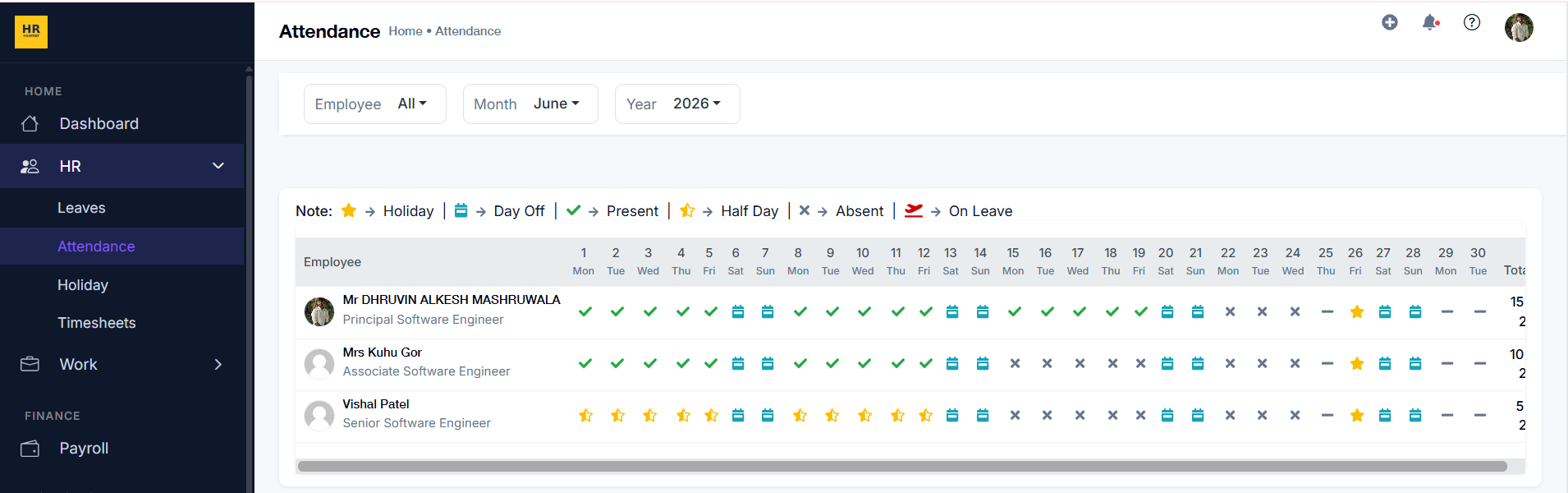
Monthly calendar attendance for every employee with colour-coded indicators — Present, Absent, Half Day, On Leave, Holiday, and Day Off — all filterable by employee, month, and year.
HRXpert covers the full employee lifecycle — from day-one onboarding to monthly payroll — so your team spends less time on admin and more time on people.
Employees apply for Casual, Sick, Annual, or custom leave types. Managers approve or reject with a reason. Full-day, first-half, and second-half options supported.
Monthly attendance grid per employee with clock-in/out from the dashboard. Holiday, Day Off, Present, Half Day, Absent, and On Leave states — all in one calendar.
Company holiday schedule displayed in a colour-coded calendar and table view. Filter by month or year, with per-holiday details and type differentiation.
Weekly timesheet entry by project and task. Employees submit for manager approval. Full approval/rejection workflow with notes, feeding directly into payroll.
Create and manage client projects with timelines, assigned members, status tracking, and task breakdown. Search and filter by name, status, or date range.
Full task lifecycle from creation to completion. Assign tasks, set deadlines, priorities (Low/Medium/High), and filter by status — To Do, In Progress, or Completed.
Log actual hours worked per task and project with start/end times and memos. Time logs feed into project billing reports and timesheet calculations automatically.
Maintain a client directory with contact details, linked projects, and invoices. Quickly view a client's full history and associated billing in one profile view.
Employees view monthly payslips with full salary breakdowns — basic pay, allowances, bonuses, deductions, and net pay — and download PDF copies on demand.
View, filter, and manage invoices by client, status (Draft, Sent, Paid, Overdue), or date range. Download as PDF or send directly to clients from the platform.
Company-wide announcements and notices published by HR or admins. Employees receive email notifications for important updates and can read full notice details.
A structured library for company policies, employee handbooks, forms, templates, and training materials. Searchable and downloadable by all permitted employees.
Company event calendar with details including description, date/time, location, and attendees. Email invitations sent automatically. Filter by type or date range.
Track all company assets — laptops, phones, equipment — assigned to employees. View serial numbers, purchase dates, condition, and full inventory at a glance.
HRXpert is role-aware — each team member sees only what they need. Employees manage their own records; managers approve and oversee; admins configure and control.
Navigate to HR → Leaves, click Add Leave, select type, dates, and duration. Submit — your manager is notified instantly for approval.
Go to HR → Timesheets, select your week, log hours per project and task, then click Submit. Your manager reviews and approves in one click.
Under Work → Time Logs, add a time log with project, task, start/end time, and a memo. Hours feed automatically into reports and payroll.
Click Payroll from the sidebar, select the month, view the full salary breakdown, and download as a PDF — available the moment payroll is processed.
Open Profile Settings from the top-right avatar menu. Update personal info, emergency contacts, or change your password — changes save instantly.